
Gametime - Last Minute Tickets
GametimeEvents
4.837.52K Reviews
- Version
- 2026.30.0
- Installs
- 5.00M
- Age Rating
- Everyone
Screenshots
Our Review of Gametime - Last Minute Tickets
 Analysis by Appyee
Have you ever found yourself scrambling for last-minute tickets to a concert or a game? I know I have! That’s where Gametime comes to the rescue. I recently gave this app a whirl, and let me tell you, it’s a game-changer for spontaneous plans.
What is Gametime All About?
Gametime is your go-to app for snagging tickets at the eleventh hour. It’s designed to make buying tickets for concerts, sports events, and shows a breeze, even if you’re booking just a few hours before the event starts. The app promises a seamless experience with no hidden fees, which is a massive relief for anyone who’s ever been blindsided by unexpected charges.
That last-minute focus is the clearest reason I’d keep it on my phone. Gametime is an events app from developer Gametime, aimed at people choosing among live sports, concerts, festivals, and comedy rather than managing a season of plans in advance. It is free to install, rated for Everyone, and has a 4.8 average from around 84,000 ratings. It has been installed over 5 million times, which suggests it has found a sizeable audience, though popularity alone cannot tell you whether a particular event will suit your budget or taste.
The distinction that matters is the kind of decision you’re making. If you already know the exact date, section, and seat you want, a venue’s own ticketing channel or a broader ticket marketplace may be the more direct place to compare inventory. Gametime makes more sense when the event is already on your mind but the details are flexible: tonight or tomorrow, one nearby venue or another, a regular seat or a cheaper option that gets you through the door. I find that flexibility useful, but it does mean the app is best treated as a way to explore choices, not as a promise that every event will have the ideal seat.
User-Friendly Experience
The first thing that caught my attention was how easy it was to navigate the app. The interface is clean, intuitive, and you can find your way around without any fuss. Whether you’re a tech wizard or just someone trying to catch a game, you’ll feel right at home.
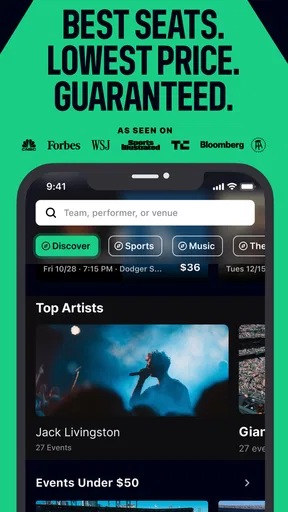
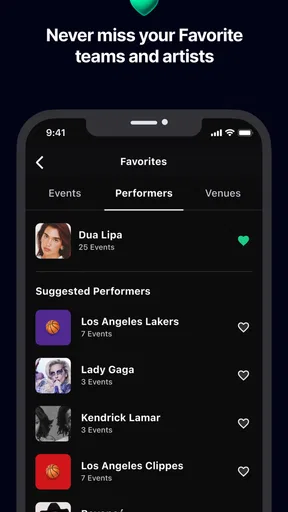
When you open the app, you’re greeted with a list of events happening near you. You can browse through categories like sports, concerts, and theater. The search function is pretty robust, allowing you to filter by date, location, and price. So if you’re hunting for budget-friendly options or looking to splurge on front-row seats, you’re covered.
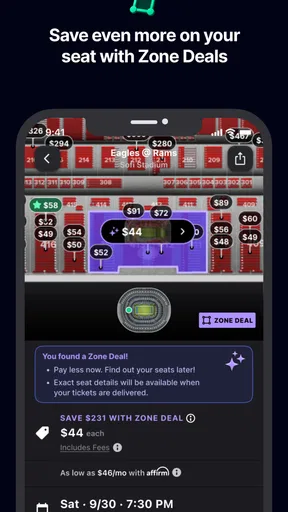
For practical browsing, I’d start with a date and area rather than scrolling through everything. That turns a vague idea—“I’d like to go out this weekend”—into a manageable comparison. Then I’d check the event details and seating options before deciding whether a deal is actually attractive. A low headline price is not enough on its own: the relevant question is whether the location and view work for you at the total amount shown during checkout. Seat maps are useful for orientation, but they are not a substitute for knowing what you personally consider an acceptable view.
One everyday situation where this approach fits is a free evening that opens up unexpectedly. I might check what is nearby, compare a game with a concert, and decide based on the start time, location, and available seat choices. If I’m coordinating with friends, I’d settle on a rough spending limit and preferred area before browsing together; otherwise, the group can lose time debating options that were never realistic for everyone. Gametime is useful in that moment because it brings different kinds of live events into one search, but the final choice still depends on availability and individual priorities.
The Buying Process – Quick and Painless
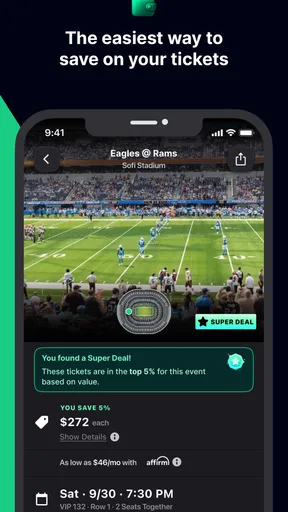
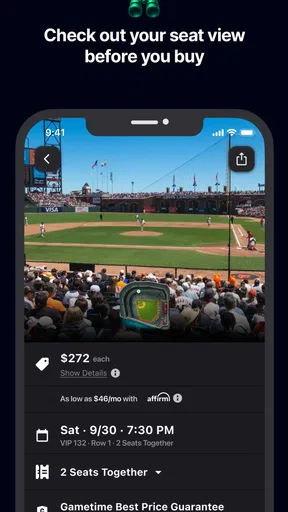
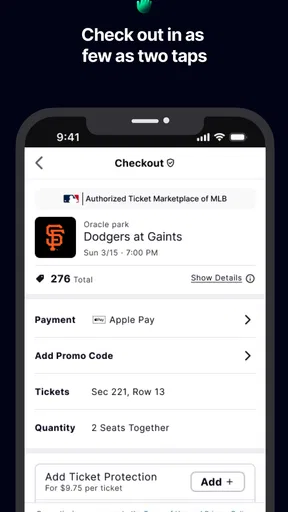
Once you find an event that piques your interest, buying tickets is as easy as pie. The app shows you a seating chart, and you can see exactly where you’ll be sitting. This feature is super handy for those of us who like to know what kind of view we’re paying for. After you select your seats, the checkout process is straightforward. One thing I appreciated was the no hidden fees policy, making it clear what you’re paying for upfront.
My advice is to pause at the seat-selection and checkout stages rather than treating speed as the only goal. A map can help you compare sections, but I would still read the seat information carefully and confirm the event, date, and quantity before completing a purchase. This small check is especially worthwhile if you are buying while walking, talking with friends, or rushing to make plans. A fast flow is only helpful when you leave enough attention for the details that determine where you’ll end up.
People often wonder whether an app focused on last-minute buying is only useful when the event is about to begin. I see it as most relevant when timing is flexible and you are comfortable comparing what is currently available, rather than when you need a particular seat far in advance. For a fixed family outing or a special occasion where everyone must sit together, I’d begin planning earlier and compare the venue’s options with marketplaces. Last-minute browsing can be a bonus for an open evening, but it is not a reliable substitute for planning around a specific requirement.
Speed, Busy Moments, and Reliability
Gametime’s simple browsing and checkout flow give it the feel of an app meant for quick decisions. I would expect it to be most comfortable when you have a stable connection and a few minutes to compare choices, not when you are trying to make a purchase while distracted or already entering a venue. Ticket availability can change in a live marketplace, so a seat you have been considering may not remain an option indefinitely. That is a general trade-off of shopping for event tickets close to showtime, not a reason to skip the app; it is a reason to decide what matters before you start.
In a heavy-use moment—say, several friends are trying to choose between events for the same evening—I’d avoid repeatedly reopening searches without a plan. Agree on the date, travel area, maximum spend, and whether everyone needs seats together. Then compare a short list. This is a more useful way to handle a crowded decision than assuming any ticket app can make group preferences disappear. If togetherness is essential, I would prioritize seat arrangements over a tempting price and be ready to pass if the available options do not fit.
On reliability, I would separate the app’s ease of use from the certainty of a live ticket purchase. A clear screen and smooth navigation are reassuring, but they cannot guarantee that an event, seat, or price will remain unchanged while you decide. The original review’s mention of a Gametime Guarantee is a reason to pay attention to the terms attached to a purchase: I would read the relevant details rather than treating a guarantee as a replacement for checking the order. If something looks wrong, reviewing the order information promptly is a sensible first step.
For recovery from a mistake, my practical rule is to stop and inspect the confirmation details as soon as the transaction is complete. Check the event and seat information while the purchase is fresh in your mind, and use the app’s available support route if the details do not match what you intended. I would not assume that a purchase can be casually changed or reversed; ticket rules can depend on the transaction. That makes careful confirmation more valuable than shaving a few seconds off checkout.
Extra Perks and Features
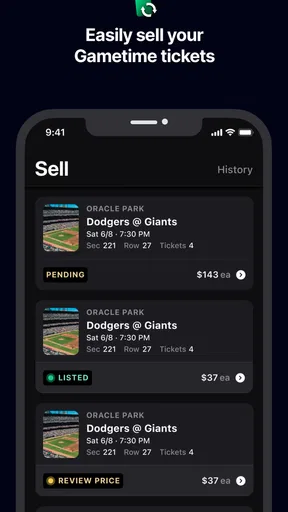
One of the coolest features is the LastCall option, which offers significant discounts on tickets as the event draws nearer. If you’re feeling adventurous and don’t mind a little suspense, this is a fantastic way to score a deal. Plus, there’s a feature called “Snap & Sell,” allowing you to quickly sell your tickets if your plans change unexpectedly.
LastCall’s appeal is clearest when the event itself matters more to you than securing a particular location. I’d consider it for a flexible evening, but not for a celebration where I had promised friends a specific section or where arrival timing was tight. Waiting may create an opportunity to find a lower price, yet it also narrows the time available to compare and make arrangements. The useful question is not simply “Could this get cheaper?” but “Would I still be happy going if the remaining options are different from what I first wanted?”
Snap & Sell is relevant to another real-life problem: plans can change after buying. I’d regard it as a possible way to handle an unwanted ticket, not as a guarantee that a resale will be immediate or that every ticket can be sold under every circumstance. If I knew an event was uncertain, I would check the applicable details before purchasing rather than relying on resale as an exit plan. That caution matters most when the ticket is expensive to you or when the event is close enough that there is little time to make new arrangements.
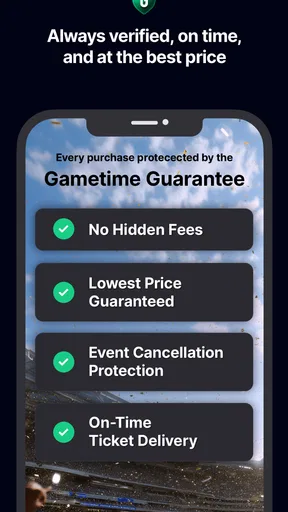
Gametime also has a "Gametime Guarantee," ensuring that if anything goes wrong with your tickets, they’ve got your back. This kind of customer service is a big plus in my book and gives you peace of mind when making a purchase.
For a new user, I would treat that reassurance as one part of the buying decision, alongside the event details and the terms shown for the order. It is sensible to keep your confirmation accessible and to know where to look for help if the ticket information raises a concern. That is more practical than assuming that a guarantee means every problem will have the same solution. The feature can add confidence, but the best protection is still to verify what you are buying before you commit.
Device Fit and Who Should Use It
The app’s current version is 2025.31.0, and its minimum operating-system requirement is 8.0. That gives people with supported devices a clear baseline to check before downloading. I would still keep the app reasonably current and leave enough free space for ordinary updates, but I would not expect an older or constrained phone to feel identical to a newer one. For a ticket search, the bigger practical issue is often whether you can browse comfortably and maintain a dependable connection during checkout.
I would recommend Gametime most to people who enjoy live events but do not need every detail fixed far in advance: sports fans open to different sections, music listeners comparing nearby shows, or friends making a spontaneous plan. It is also a natural fit for someone who likes to weigh event type, date, area, and price in one browsing session. If you are someone who would rather decide on the night than build a calendar weeks ahead, that emphasis is a real advantage.
I’d be less likely to rely on it as my only option for a major occasion, a large group that must sit together, or a buyer who needs a particular seat or event with certainty. In those cases, checking an official venue channel and comparing other established ticket sources can be worth the extra effort. The alternative is not automatically better; it simply may give you a more suitable route when advance planning, exact seat requirements, or a specific event takes priority over flexibility.
Final Thoughts
All in all, Gametime is a solid option for anyone looking to buy last-minute tickets without the hassle. Whether you’re a die-hard sports fan, a music lover, or just someone who likes to seize the moment, this app is worth having on your phone. It’s reliable, easy to use, and can save you a few bucks in the process. So next time you’re in a pinch for tickets, give Gametime a try and thank me later!
My performance verdict is measured rather than absolute: its appeal is the quick path from browsing live events to weighing ticket choices, while the main friction comes from the uncertainty that naturally accompanies last-minute availability. I would not choose it because I expect every search to be instant or every deal to suit me; I would choose it because it can make an open evening easier to turn into a plan. The app has been around since March 12, 2014, and its 35,000 reviews offer another reason to look at the experiences of other buyers, while remembering that each event and transaction is its own case.
If you want a free way to explore last-minute possibilities across sports, concerts, festivals, and comedy, Gametime is worth trying. I’d use it with a clear budget, check seat details before paying, and keep a backup plan when the event or group arrangements are non-negotiable. Those habits make its strengths more useful and its trade-offs easier to manage.
Privacy and Permissions
See what permissions an app requests and how it handles your data.
- Identity
- find accounts on the device, read your own contact card
- Contacts
- find accounts on the device, read your contacts, modify your contacts
- Location
- approximate location (network-based)
- Phone
- read phone status and identity
- Photos/Media/Files
- read the contents of your USB storage, modify or delete the contents of your USB storage
- Storage
- read the contents of your USB storage, modify or delete the contents of your USB storage
- Camera
- take pictures and videos
- Wi-Fi connection information
- view Wi-Fi connections
- Device ID & call information
- read phone status and identity
- Other
- view network connections, control flashlight, full network access, control Near Field Communication, run at startup, draw over other apps, control vibration, prevent device from sleeping, read Google service configuration
Verdict
Strengths of Gametime - Last Minute Tickets
- Easy-to-use interface for quick navigation.
- Instant ticket delivery to your mobile device.
- Great last-minute deals and discounts.
- Secure payment options ensure safe transactions.
- Option to compare prices across events.
Limitations of Gametime - Last Minute Tickets
- Limited ticket availability for popular events.
- Service fees can be higher than expected.
- No refund policy for canceled events.
- Occasional app crashes during peak times.
- Customer service response can be slow.
Similar Picks in This Category
View All
Easy Quran Mp3 Audio Offline
Muslim Worldapp4.7

Invitation Maker: Cards & RSVP
Greetings Island4.9

StubHub - Live Event Tickets
StubHub4.3

Fever: Events & Tickets
Fever Labs4.7

Epic Freebie Games Radar
Arioch Pds - Apps & Games4.4

Invitation card Maker, Design
Splendid App Maker4.9
Frequently Asked Questions
What is Gametime and how does it work?
Gametime is a mobile app designed to simplify purchasing last-minute tickets for sports, concerts, and theater events. Users can browse available events, view seat maps with real-time availability, and make purchases directly through the app. The platform offers digital tickets that can be delivered instantly, ensuring a seamless, paperless entry to your favorite events.
Can I trust the tickets purchased through Gametime?
Yes, Gametime is known for its reliable ticket purchasing service. The app guarantees that all tickets are authentic and will be accepted at the event. In case of any issues, Gametime offers customer support and a money-back guarantee, providing peace of mind for users when purchasing tickets through the platform.
Are there any extra fees when buying tickets on Gametime?
While Gametime aims to offer competitive pricing, users should be aware that additional service fees may apply. These fees are typically included in the final price displayed before purchase. It’s recommended to review the total cost carefully to understand any extra charges that may be incurred.
How does Gametime handle ticket delivery and entry?
Gametime specializes in digital ticket delivery, eliminating the need for physical tickets. Once a purchase is made, tickets are delivered electronically to the app, allowing users to access them easily and securely. This digital format ensures quick entry to events, as tickets can be scanned directly from your mobile device.
What if I need to cancel or change my ticket on Gametime?
Gametime's policy generally does not allow cancellations or exchanges once a ticket is purchased, due to the nature of last-minute ticket sales. However, users are encouraged to contact customer support for specific inquiries, as they may provide assistance or solutions depending on the situation and event policies.
